Off-the-shelf workflows
This page is a technical reference for RAFT’s off-the-shelf workflow configuration layout and supporting metadata.
Repository organization
Public off-the-shelf workflow configuration repositories are hosted under the
workflow-configs group.
RAFT inspects these repositories to list available workflows (for example,
raft available-workflows) and to initialize workflow projects (for example,
raft run).
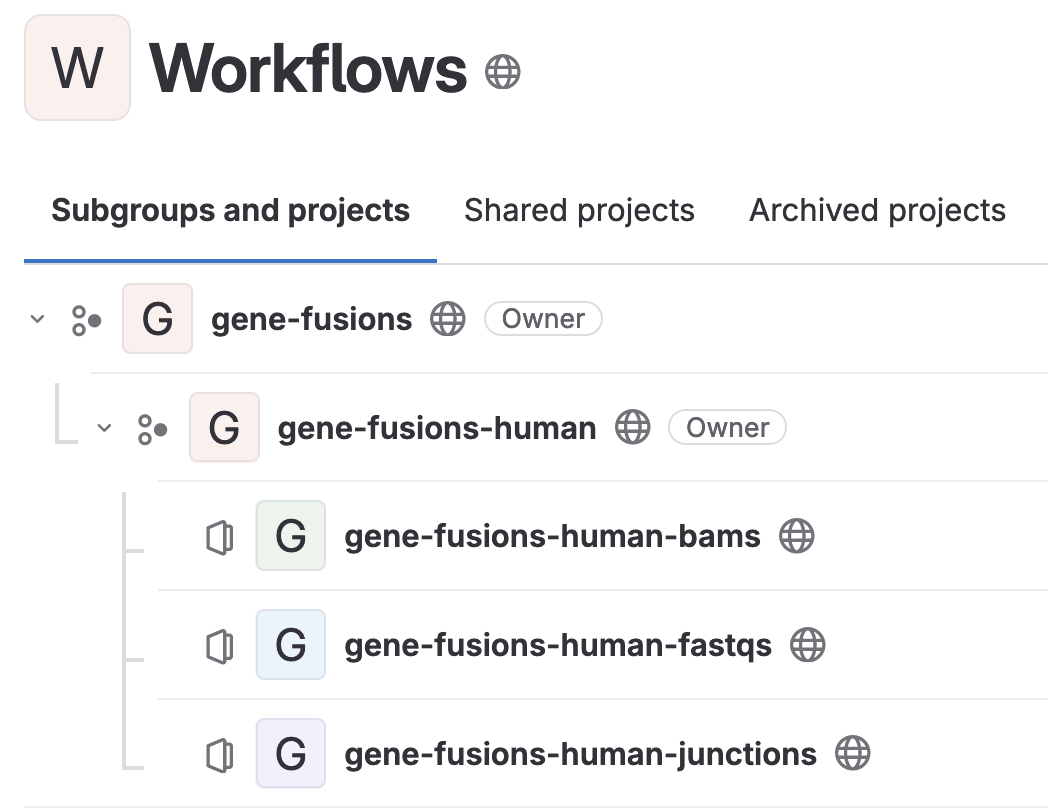
The general repository structure follows:
workflows (subgroup)
  \
   \___<WORKFLOW_NAME>
          \
           \___<WORKFLOW_NAME>-<SPECIES>
                 \
                  \___<WORKFLOW_NAME>-<SPECIES>-<INPUT_TYPE1>
                   |
                   |__<WORKFLOW_NAME>-<SPECIES>-<INPUT_TYPE2>
                   |
                   |__<WORKFLOW_NAME>-<SPECIES>-<INPUT_TYPE3>
An example is shown below:
Configuring off-the-shelf workflows
Each off-the-shelf workflow typically includes at least two files:
A configuration file containing workflow parameter defaults
A JSON file describing the workflow
Off-the-shelf configuration file
The configuration file defines default values for workflow parameters. Each
line follows the pattern <PARAMETER> = <VALUE>. The configuration filename
should follow the <workflow>.<species>.<input_type>.config convention.
For example:
params.utilities$parse_manifest$separator = '\t'
params.alignment$manifest_to_alns$fq_trim_tool = 'fastp'
params.alignment$manifest_to_alns$fq_trim_tool_parameters = "[]"
params.alignment$manifest_to_alns$aln_tool = 'bwa-mem2'
params.alignment$manifest_to_alns$aln_tool_parameters = "[]"
params.alignment$manifest_to_alns$aln_ref = "${params.ref_dir}/Homo_sapiens_assembly38.fasta"
params.alignment$manifest_to_alns$gtf = ''
params.alignment$manifest_to_alns$alt_ref = ''
params.alignment$alns_to_procd_alns$aln_ref = "${params.ref_dir}/Homo_sapiens_assembly38.fasta"
params.alignment$alns_to_procd_alns$bed = "${params.ref_dir}/hg38_exome.bed"
params.alignment$alns_to_procd_alns$gtf = ''
params.alignment$alns_to_procd_alns$dup_marker_tool = 'picard'
params.alignment$alns_to_procd_alns$dup_marker_tool_parameters = "[]"
params.alignment$alns_to_procd_alns$base_recalibrator_tool = 'gatk4'
params.alignment$alns_to_procd_alns$base_recalibrator_tool_parameters = "[]"
params.alignment$alns_to_procd_alns$indel_realign_tool = ''
params.alignment$alns_to_procd_alns$indel_realign_tool_parameters = "[]"
params.alignment$alns_to_procd_alns$known_sites_ref = "${params.ref_dir}/Homo_sapiens_assembly38.dbsnp138.vcf.gz"
params.germline$manifest_to_germ_vars$germ_var_caller = 'deepvariant'
params.germline$manifest_to_germ_vars$germ_var_caller_parameters = "['deepvariant': '--model_type WES']"
params.germline$manifest_to_germ_vars$germ_var_caller_suffix = "['deepvariant': '.deepv']"
params.germline$manifest_to_germ_vars$aln_ref = "${params.ref_dir}/Homo_sapiens_assembly38.fasta"
params.germline$manifest_to_germ_vars$bed = "${params.ref_dir}/hg38_exome.bed"
JSON workflow description file
The JSON workflow description file describes the workflow’s building blocks and required references. An example follows:
{
  "modules": ["germline"],
  "steps": {
    "parse_manifest": "utilities",
    "manifest_to_alns": "alignment",
    "alns_to_procd_alns": "alignment",
    "alns_to_germ_vars": "germline"
  },
  "references": [
    "https://storage.googleapis.com/genomics-public-data/resources/broad/hg38/v0/Homo_sapiens_assembly38.fasta",
    "https://storage.googleapis.com/genomics-public-data/resources/broad/hg38/v0/Homo_sapiens_assembly38.dbsnp138.vcf",
    "hg38_exome.bed"
  ],
  "references_postproc": {
    "Homo_sapiens_assembly38.dbsnp138.vcf": "bgzip"
  },
  "find_and_replace": {
    "manifest_to_alns(\n  MANIFEST": "manifest_to_alns(\n  parse_manifest.out.manifest",
    "alns_to_procd_alns(\n  ALNS": "alns_to_procd_alns(\n  manifest_to_alns.out.alns",
    "alns_to_germ_vars(\n  ALNS": "alns_to_germ_vars(\n  alns_to_procd_alns.out.procd_bams",
    "MANIFEST)": "parse_manifest.out.manifest)",
    "VCFS,": "'',",
    "JUNCTIONS,": "'',"
  }
}
The JSON workflow description file consists of modules, steps,
references, references_postproc, and find_and_replace. A
description of each section follows.
modules
The modules section consists of any RAFT modules that need to be loaded for the
workflow to function. RAFT is capable of resolving any module dependencies, so
the list of required modules does not have to be exhaustive. For example, in
the above example the germline module referenced loads every other module
needed to support germline variant calling.
steps
The steps section lists every step required for the workflow. These steps are
loaded into the workflow in the order presented. Generally speaking, these
steps should be combined within workflow to create an end-to-end-workflow. In
the above example, 1) parse_manifest parses the user-provided manifest, 2)
manifest_to_alns loads the FASTQs, performs trimming, and aligns FASTQs to
the reference, 3) alns_to_procd_alns performs any alignment sanitization,
and 4) alns_to_germ_vars performs germline variant calling.
references
The references section consists of all references required for running the
workflow. URLs can be provided if available. References that are not available
for external sources are assumed to be available in the RAFT global
references/ directory (raft/references/).
references_postproc
The references_postproc section includes any postprocessing steps that should
be performed to references after downloading them. In the above example,
Homo_sapiens_assembly38.dbsnp138.vcf is compressed with bgzip after
downloading. Note that this functionality can be used to run bash on
scripts that download or generate references as well (see the lens
workflow for an example).
find_and_replace
The find_and_replace section provides instructions for finding strings within
the main.nf files and replacing them with the provided text. RAFT provides
placeholder variables in CAPITAL LETTERS when creating a workflow. These
variables are expected to be changed by the user prior to running the workflow.
The find_and_replace section effectively automates this variable replacement,
removing the burden from the end user.
In the example above, we can see that the line
manifest_to_alns(
  MANIFEST
will be replaced with
manifest_to_alns(
  parse_manifest.out.manifest
Unfortunately, getting the find and replace string correct may take a bit of trial and error.