Modules
Available modules
RAFT exposes several discovery commands for workflow building blocks:
$ raft available-modules
raft available-modules lists all discoverable modules. The output is often
long, for example:
abra2            germline                mixcr          sequenza
accucopy         gffread                 mm2-fast       seurat
alignment        gtfparse                multiqc        singlecell
antigen.garnish  gtftogenepred           neos           sniffles
arcashla         haplotypetools          neosplice      snpeff
arriba           hervquant               netctlpan      somalier
bbmap            hifiadapterfilt         netmhciipan    somatic
bcftools         hificnv                 netmhcpan      spladder
bedtools         hiphase                 netmhcstabpan  splice
...
Note
The example output above is truncated. Run the commands directly to see the current state of the public module repositories.
Module types
RAFT currently works with four broad module categories:
tools: tool-level modules such asbwa,star, andsalmonworkflows: end-to-end workflowssubworkflows: reusable nested workflow components used by larger workflowsdataset-prep: dataset preparation repositories used byraft run --datasetandraft load-dataset
Tool-level modules
Tool-level modules generally wrap one tool or one closely related set of tool commands. These modules are meant to keep execution logic reusable across many workflows.
For example, a tool like bwa may expose separate processes for reference
indexing and read alignment. In some cases a module may combine tightly coupled
commands into a single process when that is operationally useful. A common
example is writing a BAM directly instead of materializing an intermediate SAM
file.
Subworkflow modules
Subworkflow modules organize repeated analysis patterns. They usually describe
an objective rather than a specific implementation. For example, a workflow may
define “align reads to a genome” without hard-coding whether that means
bwa-mem2, bowtie2, star, or another aligner.
This design gives RAFT two important properties:
workflows stay generic
workflows can be nested
Generic workflows
RAFT workflows are intended to describe what should be produced rather than the exact tool that must be used.
For example, an alignment-oriented module may contain workflow names such as:
workflow manifest_to_transcript_counts
workflow raw_fqs_to_transcript_counts
workflow procd_fqs_to_transcript_counts
These names describe the input state and the desired output state. That makes it easier to extend a workflow later with new tools without changing the high-level workflow name.
Nested workflows
RAFT workflows are commonly nested. A higher-level workflow can call a more specialized workflow instead of reimplementing the same logic.
Conceptually, that looks like:
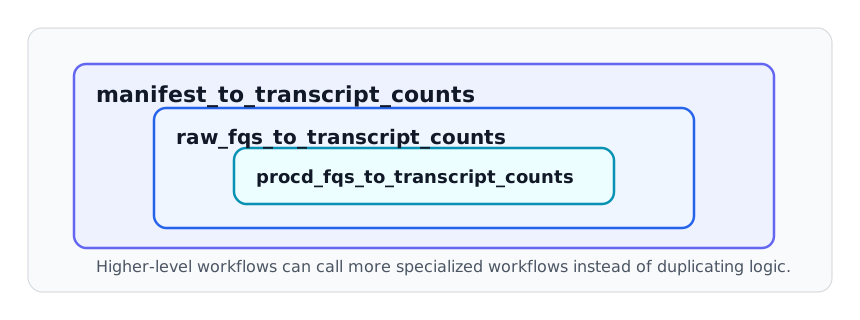
This approach keeps shared logic in one place. A bug fix in a lower-level workflow can propagate upward without duplicating the change across multiple entry points.
It also allows multiple entry points for the same analysis objective. For example, one user may start from a manifest, while another may already have processed FASTQs and want to enter farther downstream.
Tool selection and parameter parsing
Generic workflows are paired with workflow parameters that control which tools run and which arguments those tools receive.
A common pattern is:
<task>_tool: selects one or more tools<task>_tool_parameters: passes tool-specific arguments
For example:
aln_tool = 'star'
aln_tool_parameters = "['star': '--quantMode TranscriptomeSAM --outSAMtype BAM SortedByCoordinate --twopassMode Basic --outSAMunmapped Within']"
In this pattern, aln_tool selects star and
aln_tool_parameters provides the arguments to pass to that tool.
In Nextflow/Groovy code, the parameter string is typically converted into a map-like structure and then inspected conditionally. A simplified example is:
aln_tool_parameters = Eval.me(aln_tool_parameters)
if (aln_tool =~ /my_favorite_tool/) {
    my_favorite_tool_parameters = aln_tool_parameters['my_favorite_tool'] ? aln_tool_parameters['my_favorite_tool'] : ''
    my_favorite_tool(
        procd_fqs,
        idx_files,
        my_favorite_tool_parameters
    )
    my_favorite_tool.out.alns.set { alns }
}
If a tool requires multiple internal steps, each step can have its own key in the parameter map. For example, a workflow may use separate keys for index generation and alignment:
if (aln_tool =~ /bbmap/) {
    bbmap_index_parameters = aln_tool_parameters['bbmap_index'] ? aln_tool_parameters['bbmap_index'] : ''
    bbmap_parameters = aln_tool_parameters['bbmap'] ? aln_tool_parameters['bbmap'] : ''
    bbmap_index(
        aln_ref,
        bbmap_index_parameters
    )
    bbmap_samtools_sort(
        procd_fqs,
        bbmap_index.out.idx_files,
        bbmap_parameters
    )
    bbmap_samtools_sort.out.alns.set { alns }
}
Conditional execution
Many RAFT workflows allow either one tool or several tools to run for the same task. This is usually implemented with conditional checks against the selected tool string.
That makes it possible to:
run a single preferred tool
run several tools in parallel for comparison
switch tools without changing the workflow structure itself
In practice, this means the workflow graph stays stable while tool choice moves into configuration.
Practical implications
For day-to-day use, the main consequences are:
available tools and subworkflows can change as the public repositories evolve
workflow configs choose defaults, but users can override tool-selection parameters
adding a new tool often does not require inventing a brand-new top-level workflow if an existing generic workflow already models the task
See also
Choosing a workflow for user-facing workflow selection
Browser-based UI tools for browser-based configuration tools
Off-the-shelf workflows for the technical structure of off-the-shelf workflow configuration repositories
Manual workflow and module assembly for manual module loading and step assembly
Managing RAFT projects for project packaging and maintenance commands