Accessing and reviewing outputs
Accessing workflow outputs
RAFT stores workflow outputs under each project’s outputs/ directory. Most
sample-level and patient-level files are written under outputs/samples/.
Output categories
RAFT outputs usually fall into three broad categories:
outputs/samples/contains sample-level, pair-level, and patient-level workflow outputsoutputs/reports/contains workflow execution reports such as Nextflow reports, traces, and timelinesoutputs/qc/contains quality-control summaries and related metrics when a workflow generates them
If you are looking for biological results, start with outputs/samples/. If
you are trying to understand what ran, how long each step took, or whether a step
failed, check outputs/reports/ and the project’s logs/ directory.
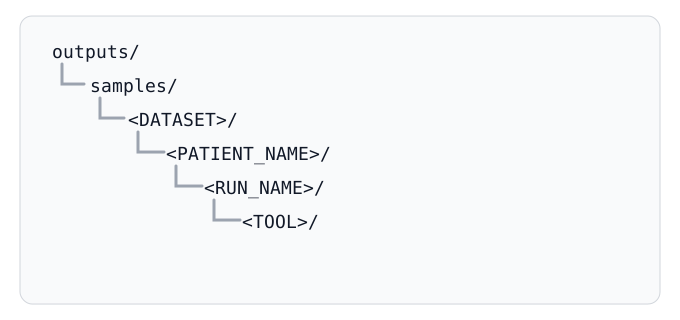
The directory structure is organized hierarchically by dataset, patient, run, and tool:
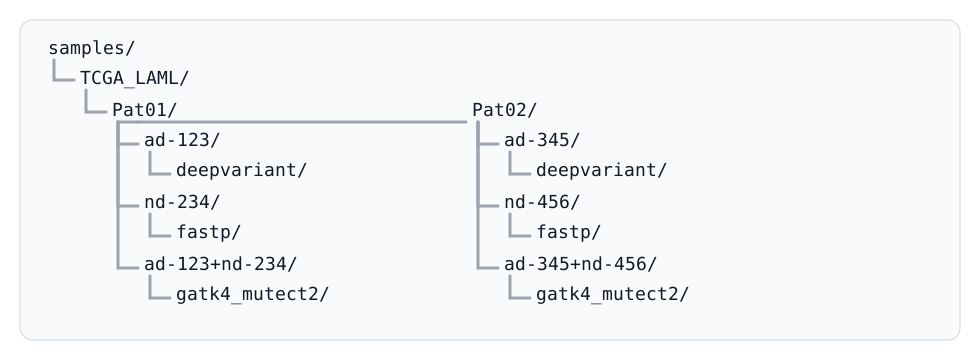
For example, a project with two patients might look like this:
How output names map to the manifest
RAFT uses manifest fields to organize outputs. In general:
dataset directories come from the manifest
Datasetcolumnpatient directories come from the manifest
Patient_Namecolumnrun directories come from the manifest
Run_Namecolumn
Some workflows also create combined run directories such as
ad-123+nd-234. These represent outputs generated from paired or grouped
inputs rather than from a single run alone.
Finding specific outputs
The fastest way to find a specific file type is usually the find command.
For example, to list all VCF files produced by a project:
$ find /path/to/raft/projects/<PROJECT_ID>/outputs -name "*vcf*"
To list all BAM files produced by a project:
$ find /path/to/raft/projects/<PROJECT_ID>/outputs -name "*.bam"
To list workflow execution reports:
$ find /path/to/raft/projects/<PROJECT_ID>/outputs/reports -maxdepth 1 -type f
To list QC-related files:
$ find /path/to/raft/projects/<PROJECT_ID>/outputs -path "*/qc/*"
If you want to copy all VCF files from a project for downstream analysis:
$ find /path/to/raft/projects/<PROJECT_ID>/outputs -name "*vcf*" -exec cp {} /path/to/destination\;
The find manual page is available in the Linux man pages.
Note
Each project’s outputs/ directory lives inside the project directory:
/path/to/raft/projects/<PROJECT_ID>/outputs.
For more information about the organization of outputs/, see Outputs.
Reviewing results
RAFT provides a web-based interface to review sample-level statistics and perform quality control checks. This interface is available by running:
$ raft generate-reports --project-id <PROJECT_ID>

The RAFT generate-reports viewer.
Note
A demonstration report is available by either running
raft generate-reports --demo or visiting the hosted demo
report page.
Troubleshooting missing outputs
If you do not see the outputs you expect:
Check
outputs/reports/for workflow execution reportsCheck the project’s
logs/directory for task logs and Nextflow outputConfirm that the relevant workflow step actually ran
Verify that you are looking under the correct dataset, patient, or run name from your manifest